How do I use the Overview tab in Card Sorting results?
Table of contents
This section covers the information found in the Overview tab:
Summary
Time Taken
Top Locations
PDF Export of the Overview tab
Summary
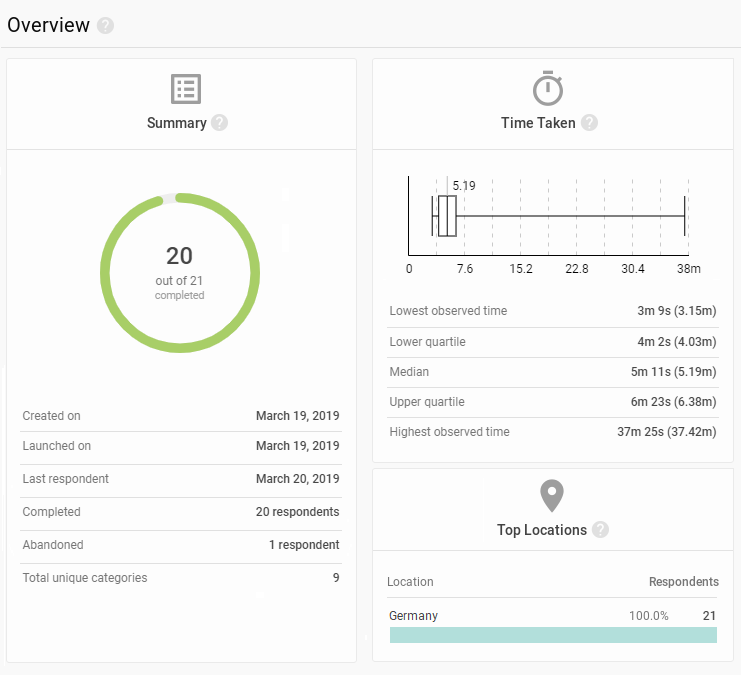
The donut chart tells you how many respondents participated and how many actually completed the study
The numbers of respondents who completed and abandoned the study are also displayed below
Created on is the date when the study draft was first made
Launched on is when data started being collected
The last respondent is the date when somebody participated in the study most recently
Time Taken
A breakdown of how long it takes people to complete your study
The candlestick chart displays the time range in which respondents completed your study
The bar illustrates the upper and lower quartiles, with the line inside marking the median value
T-shaped ‘wicks’ in the candle chart mark the highest and lowest times that it took to complete the study
Top Locations
The top three countries that your respondents came from
Location is determined based on the respondent’s IP address and, as such, can be inaccurate (such as when the respondent is using an out-of-country VPN or other means to obfuscate their presence online)
Results overview
The overview provides you with quick insight into the progress of your Card Sorting – how many respondents completed/abandoned your study, where they came from, and how long the study took them to complete.
PDF Export of the Overview tab
You can create a PDF report of all the information listed above, exactly like you can see in the web interface. To create an export, click PDF Export in the upper right corner of the tab contents.
If you wish to create a report using more than one section of your study’s results, go to the Export tab.
We need your consent to use cookies
on our website to provide you with the highest level of service.
You can change the settings by clicking the "Settings" button.
These cookies are necessary to ensure the operation and basic functions of the UXtweak website.
They store information about your UXtweak session and help protect your privacy.
Analytics cookies
These cookies are used to analyze traffic on our website, so that we can better understand our users
and improve the site's content, usability and functionality.