How do I interpret the Task Statistics in Mobile Testing?
Table of contents
In this help, we’ll discuss how to use the Task Statistics analysis to:
View Task Statistics per task
Evaluate Time Taken
View Task Statistics per task
This analysis displays Task Statistics one task at a time
Use the task selection dropdown list in the top section of the screen to switch to the task you want to analyze.
Alternatively, use the arrow buttons to the left and right of the dropdown list to move to the previous/next task.
For each task, Task Statistics contain:
The task’s text, starting URL and the correct destinations
Pie chart of task results
The pie chart and its legend display the types of results as such:
Completed– the respondent ended by pressing theTask donebutton
Skipped– the respondent pressed the button to skip the task
Evaluate Time Taken
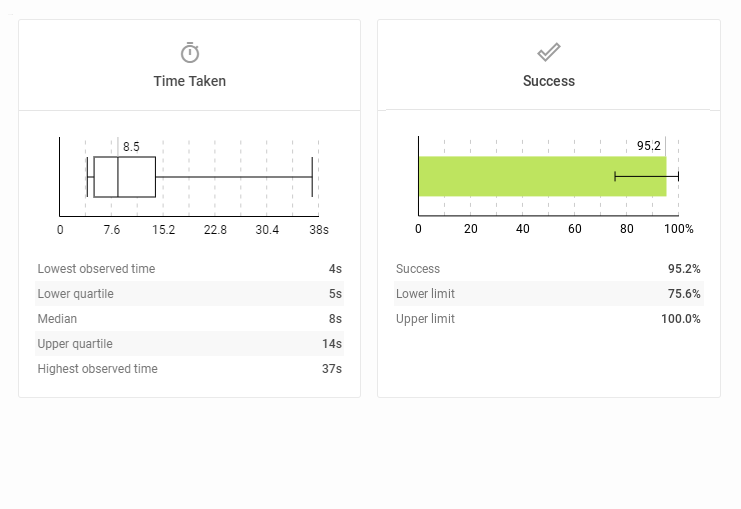
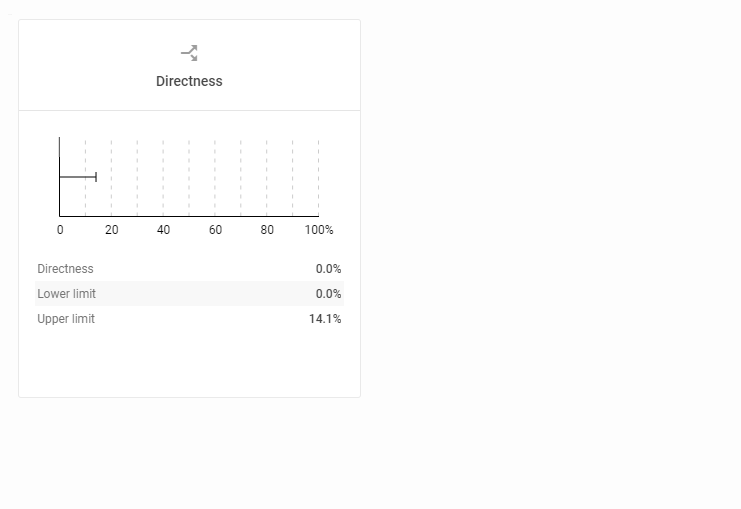
The bottom section of the Task Statistics contains the Time Taken, Success and Directness scores.
Time Taken is represented by a candlestick chart. The bar illustrates the upper and lower quartiles with the line inside marking the median value T-shaped ‘wicks’ in the candle chart mark the highest and lowest times that it took to complete the task.
Time Taken and Success
How long did the task take respondents to complete this task. Higher completion times are usually a warning sign. The success rate informs you about how many people found a right destination and how many failed to do so. It doesn’t matter if they found the solution immediately or if they had to backtrack.
Directness
The directness rate informs you about how many people reached their destinations directly, without taking a different path first, getting lost or backtracking. It doesn’t matter if they actually found a right answer or not.
We need your consent to use cookies
on our website to provide you with the highest level of service.
You can change the settings by clicking the "Settings" button.
These cookies are necessary to ensure the operation and basic functions of the UXtweak website.
They store information about your UXtweak session and help protect your privacy.
Analytics cookies
These cookies are used to analyze traffic on our website, so that we can better understand our users
and improve the site's content, usability and functionality.